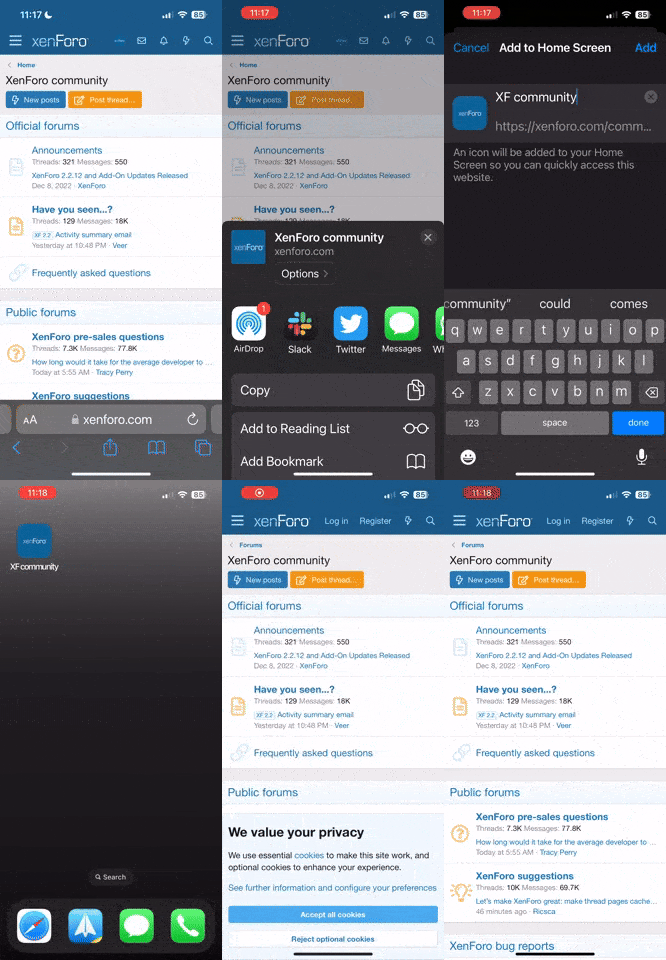
Follow along with the video below to see how to install our site as a web app on your home screen.
Note: This feature may not be available in some browsers.
Welcome to rpgcodex.net, a site dedicated to discussing computer based role-playing games in a free and open fashion. We're less strict than other forums, but please refer to the rules.
"This message is awaiting moderator approval": All new users must pass through our moderation queue before they will be able to post normally. Until your account has "passed" your posts will only be visible to yourself (and moderators) until they are approved. Give us a week to get around to approving / deleting / ignoring your mundane opinion on crap before hassling us about it. Once you have passed the moderation period (think of it as a test), you will be able to post normally, just like all the other retards.
[B], [I], [U], [S] - Bold, italics, underline, and strike-through
Makes the wrapped text bold, italic, underlined, or struck-through.
Example:
This is [B]bold[/B] text.
This is [I]italic[/I] text.
This is [U]underlined[/U] text.
This is [S]struck-through[/S] text.
Output:
This is bold text.
This is italic text.
This is underlined text.
This is struck-through text.
[COLOR=color], [FONT=name], [SIZE=size] - Text Color, Font, and Size
Changes the color, font, or size of the wrapped text.
Example:
This is [COLOR=red]red[/COLOR] and [COLOR=#0000cc]blue[/COLOR] text.
This is [FONT=Courier New]Courier New[/FONT] text.
This is [SIZE=1]small[/SIZE] and [SIZE=7]big[/SIZE] text.
Output:
This is red and blue text.
This is Courier New text.
This is small and big text.
[URL], [EMAIL] - Linking
Creates a link using the wrapped text as the target.
Marks text as a structured heading to facilitate machine readability.
Example:
[HEADING=1]Major heading[/HEADING]
This text comes under a major heading, used to separate the primary sections of an article.
[HEADING=2]Minor heading[/HEADING]
When you need to subdivide the primary sections of an article, use a level 2 minor heading.
[HEADING=3]Subheading[/HEADING]
If you require additional subdivision, you may drop to level 3.
Output:
Major heading
This text comes under a major heading, used to separate the primary sections of an article.
Minor heading
When you need to subdivide the primary sections of an article, use a level 2 minor heading.
Subheading
If you require additional subdivision, you may drop to level 3.
[PLAIN] - Plain text
Disables BB code translation on the wrapped text.
Example:
[PLAIN]This is not [B]bold[/B] text.[/PLAIN]
Output:
This is not [B]bold[/B] text.
[ATTACH] - Attachment insertion
Inserts an attachment at the specified point. If the attachment is an image, a thumbnail or full size version will be inserted. This will generally be inserted by clicking the appropriate button.
Example:
Thumbnail: [ATTACH]123[/ATTACH]
Full size: [ATTACH=full]123[/ATTACH]
Output:
The contents of the attachments would appear here.
[GALLERY=option]
- Gallery embed
BB code for displaying gallery media items and albums.